By David Lapham · Published
At a glance
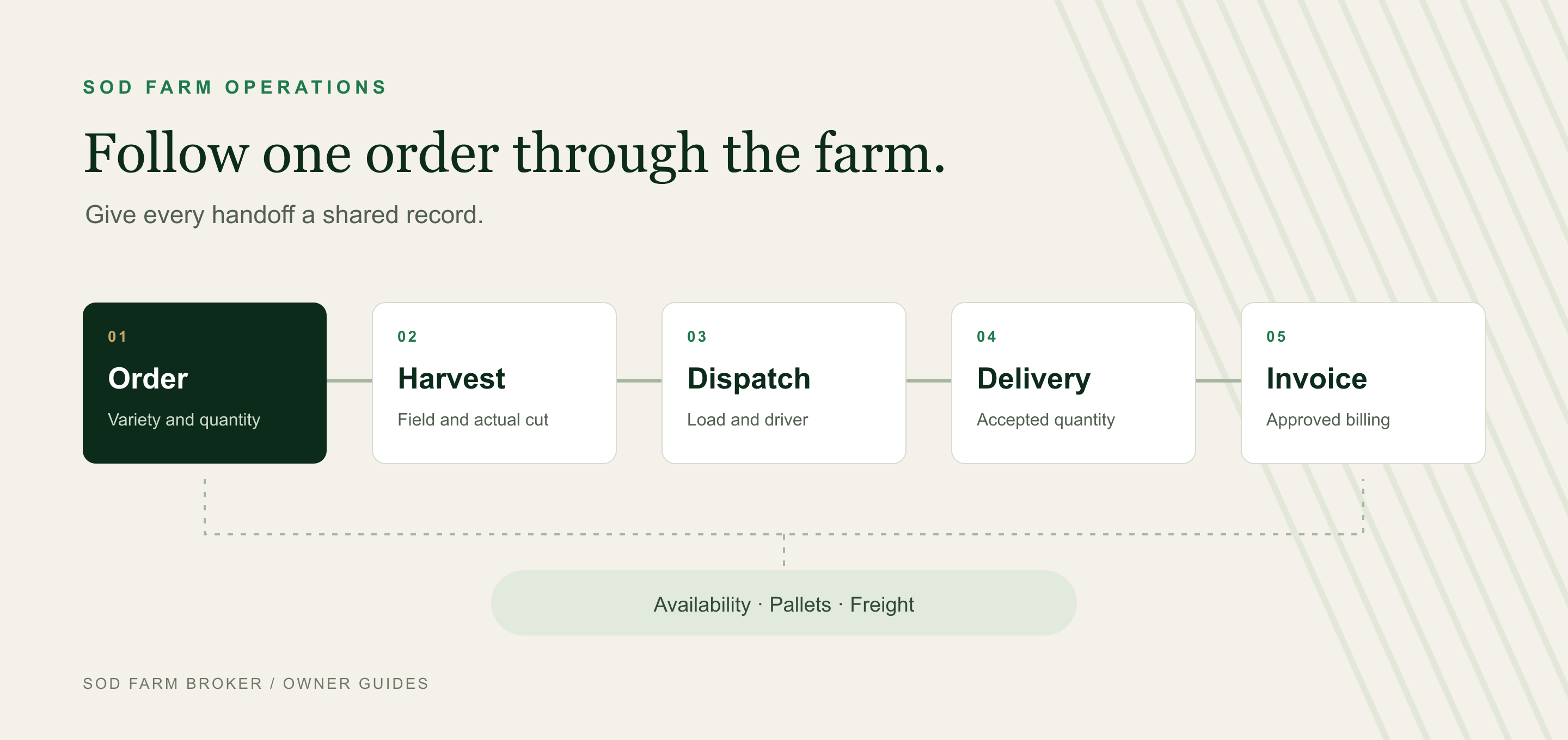
- Follow one order from available grass through harvest, dispatch, delivery, pallets, and invoicing.
- Compare packaged systems and enterprise tools before deciding where a custom build or hybrid fits.
- Own the rights, accounts, data exports, and maintenance plan behind any custom software.
- Start AI with a small task a person can review, then measure corrections and total time.
I got started in the sod industry by building a three-sided marketplace connecting sod farms, installers, and homeowners.
That background shapes how I think about software. I start with the people doing the work and the information they need. On a sod farm, that means following an order from the first request through the field, onto the truck, and into the books.
There is a broad range of operational maturity in this industry. A paper order slip, a shared spreadsheet, an industry system, and a custom application can each have a place. An owner should give out-of-the-box enterprise software a fair look. I also think farm-owned custom software is becoming a more practical option to explore, especially when a particular workflow needs a better fit.
The decision gets easier when you identify the handoff that needs to improve.
Start with the order, then choose the software
My recommendation: map one real order, identify where information gets lost or entered twice, and compare software against that process. Build a custom piece when the fit and control justify the continuing responsibility.
Sod farm software can help manage availability, sales orders, harvest, dispatch, proof of delivery, pallet balances, and accounting handoffs. The useful scope depends on your operation.
Before asking for a demonstration, write down:
- The problem you want to solve, such as outdated cut lists or invoices waiting on delivery records.
- The person responsible for keeping each record current.
- What a successful change would look like in your own operation.
A farm with reliable bookkeeping and a difficult dispatch process may need a better connection between those functions. It may not need to replace both.
What the evidence tells us about farm software
Technology access is widespread across agriculture. USDA NASS reported that 85 percent of farms had internet access in 2025. That is general farm evidence; the national tables exclude Alaska and Hawaii. It does not tell us how many sod farms use paper, spreadsheets, enterprise software, or AI agents. USDA NASS technology report, August 2025
There are already sod-specific products that document connected operational workflows. For example, Sod Squad describes dispatch by farm, field, and driver, harvest information grouped by sod type and field, and delivery photos attached to QuickBooks Online invoices. TurfLogistics’ developer description includes driver signatures, harvester cut sheets, and synchronization for offline viewing and completion.
Those are examples of documented capabilities. I have not independently tested these products for this article, and the descriptions do not establish reliability, adoption, or savings. Use them to understand what is possible, then test the details that matter to your farm.
Compare four approaches
An enterprise system coordinates several business functions through shared records and permissions. An ERP, or enterprise resource planning system, commonly connects finance, purchasing, inventory, and operations. A sod-specific package may serve that role, too.
These approaches can also work together.
| Approach | Where it may fit | What to examine |
|---|---|---|
| Paper and spreadsheets | A straightforward operation with clear responsibility and manageable coordination | Duplicate entry, competing versions, backups, and dependence on one person |
| Packaged sod industry software | A farm that wants existing order, harvest, and dispatch workflows with vendor support | Variety and unit rules, exceptions, offline scope, accounting connections, exports, and support |
| Mainstream enterprise software with integrations | An operation coordinating multiple locations, entities, or business functions | Sod-specific configuration, mobile access, connectors, implementation, and administration |
| Custom software or a hybrid | A recurring workflow needs a different fit, or a small custom component closes a specific gap | Rights in the code, farm-controlled accounts, maintenance, documentation, integrations, and handover |
I would compare the options using the same order and the same exceptions. Order complexity, staffing, and support requirements tell you more than acreage alone.
Follow one order through the farm
Give the order a consistent identifier that follows it into harvest records, delivery evidence, pallet movements, and accounting. Then make sure the process answers these questions.
1. What did the customer actually confirm?
Record the customer, job site, variety, quantity, unit, price, delivery or pickup, and agreed date or window. Include freight terms, pallet rules, and access instructions. Keep a quote separate from a confirmed order, and record who approved later changes.
2. What grass is available to promise?
Separate planted acres, grass ready to cut, unavailable areas, and quantities already reserved. Track the variety, field or block, current condition, and inspection date. A field outline on a map does not establish how much saleable grass is ready today.
3. What should the crew cut?
Send a current cut list grouped as the crew needs it. Record the actual field, quantity cut, rejected product or waste, and remaining work. A wet field or equipment problem needs a visible exception and a person responsible for revising the plan.
4. What went on the truck?
Reconcile ordered, cut, and loaded quantities. Assign the driver or carrier, equipment, stops, and promised delivery window. Check actual equipment and weight constraints rather than assuming a universal number of pallets per truck.
5. What did the customer receive?
Proof of delivery, or POD, records the delivery event. Capture the accepted quantity, time, recipient acknowledgment, photos where useful, and shortages or damage. A signature alone does not explain a rejected pallet or settle a quality dispute.
6. What happened to pallets and freight?
Track pallets issued, returned, damaged, and credited separately from square feet sold. Reconcile freight charged with carrier cost and the agreed terms. Ask for a demonstration of pallet returns; that feature was not established in the product examples above.
7. What should accounting receive?
Define the approved event that creates an invoice and how partial deliveries, credits, deposits, freight, and tax treatment are handled. Decide which system is authoritative for each record. A connection should show failed transactions and prevent duplicate posting when it retries.
8. Who closes the exceptions?
Compare ordered, cut, loaded, delivered, invoiced, and credited quantities. Assign unresolved differences to a person. An order marked “delivered” can still need a replacement decision, pallet reconciliation, or billing correction.
Use this example in a software demonstration
Consider a hypothetical order for 20 pallets of Floratam St. Augustinegrass. For this example only, assume each pallet contains 450 square feet. That makes the order 9,000 square feet. Packaging and conversion rules vary, so use your own product definitions in a real test.
Now change the order as it moves through the day.
| Event | Quantity in this example | What the records should explain |
|---|---|---|
| Confirmed order | 20 pallets / 9,000 square feet | Which variety and field supply the reservation |
| Cut and loaded | 20 pallets | Which crew, field, and load completed the work |
| Accepted delivery | 18 pallets / 8,100 square feet | What happened to the other 2 pallets / 900 square feet |
| Pallets returned later | 12 of the 20 issued | An outstanding pallet balance of 8 before other adjustments |
| Billing review | Accepted delivery differs from the order | The approved replacement, credit, or other treatment under the terms |
Rejecting grass does not automatically mean the pallet came back. Reserving grass and completing its cut should not reduce available inventory twice as if they were separate sales.
Then turn off the field device’s connection. Record a delivery, reconnect, and try a duplicate sync or a conflicting update from another device. Check pending status, attachments, and the final accounting record. A mobile-friendly screen and a dependable offline process are different capabilities.
Offline tools are available in mainstream platforms as well. Microsoft documents configured offline operation for model-driven Power Apps, with local data and later synchronization. That is a platform capability that needs configuration, rather than a ready-made sod application.
Put practical meaning behind owning custom software
I think custom software deserves consideration when an existing system does not handle an important workflow well. Better development tools expand what an owner can explore. For example, GitHub documents AI assistance for planning and making code changes. That supports the availability of development assistance, not a promise about a farm’s development cost or timeline.
Custom can mean one useful component: a field-availability tool, delivery capture, or a daily dispatch view connected to existing accounting.
If ownership is part of the reason to build, settle these points before relying on the application:
- Rights in the work. Have counsel document assignments or licenses, permitted changes, third-party components, and handover rights. Receiving source files does not itself settle copyright ownership. The Copyright Office distinguishes rights from possession of a copy.
- Control of accounts. Put the code repository, hosting, domain, billing, and administrator access under farm-controlled accounts. Keep a recovery process and a second authorized administrator.
- Usable exports. Require customer, order, field, inventory, delivery, pallet, and invoice records with stable identifiers and attachment references.
- A working handover. Another qualified maintainer should be able to understand the system, deploy it, and restore a backup. Test this.
- Continuing support. Assign responsibility for updates, broken integrations, security, urgent problems, and future changes.
Also ask who receives your farm’s data, whether it can train AI models, and what happens when you leave. Ag Data Transparent’s 2024 principles provide useful voluntary guidance on those questions; the actual agreements still matter.
Compare total cost over the same period and scope. Include setup, migration, licenses, hosting, devices, training, integrations, employee time, maintenance, changes, and exit costs. A monthly subscription and a development quote need that common basis to be compared fairly.
Separate automation, AI assistants, and agents
These terms describe different levels of work and authority.
Rules-based automation follows explicit conditions. It might flag an invoice for review when required delivery fields are complete.
An AI assistant interprets or prepares information for a person. It could extract a requested date and quantity from an installer’s email and prepare a draft order.
An AI agent can choose and execute steps through connected tools within a defined task. A limited agent could find approved delivery evidence and assemble an internal billing packet for a bookkeeper.
An AI label does not tell you how much authority a feature has. TurfLogistics’ Turf-AI help article, modified February 2025, describes help-article summaries and navigation to application screens. It does not establish autonomous dispatch or financial posting.
Start with a draft order that a person checks
For a first pilot, I would consider turning an installer’s email into a draft with the customer, variety, quantity, site, requested date, and missing information clearly marked.
Use historical or appropriately redacted examples first. Have the office approve every field before anything becomes a confirmed order. Test missing varieties, conflicting dates, customer revisions, and duplicate requests.
Keep promises to customers, dispatch changes, credits, payments, and posted invoices with authorized people during the pilot. Give the tool limited access, retain an activity log, and provide a way to stop it. Customer emails and attachments must remain business data, even if they contain text that tries to direct the tool. OpenAI’s agent safety guidance discusses these general risks, including malicious instructions and unintended data sharing.
Measure the whole job
Compare similar orders before and during the pilot. Count corrections, duplicate drafts, missing information, and total office time, including review and cleanup. For billing work, measure the delay from approved delivery evidence to an approved invoice.
Wrong varieties, unauthorized changes, or unreliable duplicate handling are reasons to stop and fix the process. A convincing draft has value only if the farm can check it and use it reliably.
Questions owners ask
What software does a sod farm need first?
Start with the handoff causing a recurring problem. That may be availability, order entry, dispatch, delivery records, or billing. Define the information and responsibility before choosing a product.
Should a small sod farm buy an enterprise system?
Size alone does not answer that. Compare order complexity, staffing, financial controls, and support needs. A simpler shared process may be sufficient; a packaged system may remove repeated coordination work.
Do I need to replace my accounting software?
Not necessarily. An operations tool can connect to an existing ledger. Specify who owns each record and how approved quantities, credits, and payments are reconciled.
Can drivers use sod software without a signal?
Some products document offline functions. Test the actual version, device, records, photos, conflicts, and reconnection process on your farm before relying on them.
Can AI confirm sod orders on its own?
That requires verified availability, current commercial terms, defined authority, and dependable controls. For an initial pilot, I would keep AI work in a draft and have a person approve the order.
Choose one improvement you can verify
Take one recent order and follow its records. Find the point where someone had to re-enter information, chase an answer, or resolve a disagreement. Write down how that handoff should work and test your software options against it.
The goal is a process your people can run, explain, and maintain. That may come from an existing system, an enterprise platform, a custom component, or a combination.
If you have a technology question about your sod farm, give me a call at (517) 990-4907. I am happy to talk through the problem you are trying to solve.
Sources and product documentation reviewed October 29, 2026. Product examples illustrate documented capabilities and are not endorsements or independent performance reviews. The worked example is hypothetical.